

Viewing Your Leads
See every lead your marketing generates in one place — where each one came from, who they are, and where they sit in your pipeline.
Every lead your marketing brings in lands on your Leads page — a form fill on your landing page, a tracked phone call, an ad click that turned into a real person reaching out. It's your whole pipeline in one place: who contacted you, how they found you, and where they are in your follow-up.
The short version: Open Leads from the left menu. Leads are grouped into stages (New, Working, Good Lead, Bad Lead), and every card shows who the lead is and how they reached you — a form, a tracked call, or an ad.
The Leads board
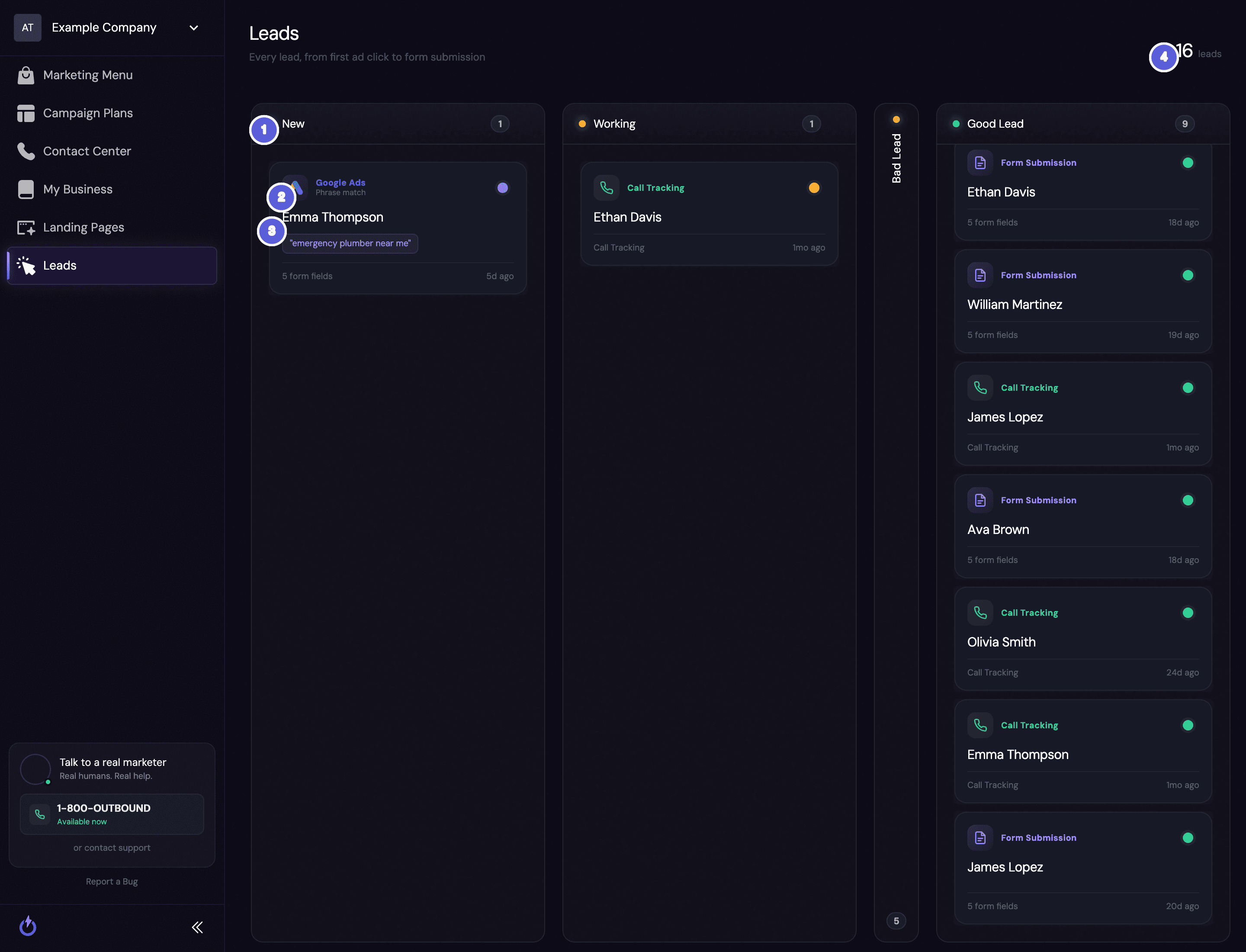
- Pipeline stages — leads are sorted into columns by where they are in your follow-up: New, Working, Good Lead, and Bad Lead.
- Where the lead came from — each card shows its source. A Google Ads lead shows the search term that brought it in (like "emergency plumber near me"), a Call Tracking lead came from a tracked phone call, and a Form Submission came from one of your landing pages.
- The lead card — the person's name, how many form fields they filled in, and when they came in. Click any card to see the full details.
- Total leads — a running count across every stage.
What the stages mean
- New — just came in, and no one has worked it yet. Start here.
- Working — someone is in contact or following up.
- Good Lead — a real, qualified opportunity — the kind of customer you want more of.
- Bad Lead — spam, a wrong number, or someone who isn't a fit.
Sorting leads into Good and Bad isn't just housekeeping. It tells us which keywords, ads, and channels bring you real customers versus wasted spend — so we can put more behind what works and cut what doesn't. The more honestly your leads are sorted, the sharper your campaigns get.
Where your leads come from
Outbound pulls every lead into one board, no matter how it arrived:
- Form submissions — someone filled out a form on one of your landing pages.
- Call tracking — someone called a tracked phone number from one of your ads. The call becomes a lead automatically, and you can review the recording, transcript, and summary.
- Google Ads — a lead that came straight from a Google ad, tagged with the search term that brought it in, so you can see which of your targeted keywords are producing customers.
Search term vs. the exact query. The tag shows your search term — the keyword we're targeting that the person's search matched, along with its match type (like Phrase match). That's not always word-for-word what they typed into Google. With phrase or broad matching, someone searching "24 hour plumber emergency" can still match your "emergency plumber near me" search term. We show the search term because it tells you which of your keywords are working — which is what we tune your campaigns around.
Related
Call Tracking on Your Ads
Why your ad landing pages show a tracking number, and how those calls become leads.
Reviewing Your Calls
Read the transcript, listen to the recording, and see the AI summary for any call.
Still stuck?
Questions about a specific lead, or how a lead was sourced? Reach out — we're happy to walk through your pipeline with you.